R Programming Language 📍

R is a programming language and free software environment for statistical computing and graphics supported by the R Core Team and the R Foundation for Statistical Computing. It is widely used among statisticians and data miners for developing statistical software and data analysis.

📽️ Videos

How to fix rselenium / wdman unable to start error

If you are getting an error starting geckodriver when using rselenium, you may want to try deleting the LICENSE.chromedriver file which accidentally attempts to be executed by wdman::geckodriver. You can do this simply in the Linux terminal by using this command. The xargs -r command only executes the rm command when there is a file matched to delete.

find ~/.local/share/ -name LICENSE.chromedriver -print | xargs -r rm

R Programming – IDW interpolation of Missing / NA Census Tract Data

You can do IDW interpolation of missing Census Tracts fairly easily in R using the gstat library. The key is to make sure you use a projected dataset. Other interpolation methods are covered here: https://rspatial.org/raster/analysis/4-interpolation.html

library(tidycensus)
library(tidyverse)
library(raster)
library(gstat)

# obtain census data on veteran status by tract and then
# reproject the shapefile geometery into a projected coordinate system

acs <- get_acs("tract",
state='ny',
survey='acs5',
var=
c('Total'='B21001_001',
'Veteran'='B21001_002'
),
cache_table = T,
geometry = T,
resolution='20m',
year = 2020,
output = "wide"
) %>% st_transform(26918)

# calculate the percentage of veterans per census tract
acs <- mutate(acs, vet_per = VeteranE/TotalE)

# create a copy of census tracts, dropping any NA values
# from vet_per field
vetNA <- acs %>% drop_na(vet_per)

# a raster should be created to do interpolation into
r <- raster(vetNA, res=1000)


# set the foruma based on field (vet_per) that contains
# the veterans percent to interpolate. This use IDW interpolation
# for all points, weighting farther ones less
gs <- gstat(formula = vet_per~1, locations = vetNA)

# interpolate the data (average based on nearby points)
nn <- interpolate(r, gs)

# extract the median value of the raster interpolation from the original shapefile,
# into a new column set as est
acs<- cbind(acs, est=exactextractr::exact_extract(nn, acs, fun='median'))

# replace any NA values with interpolated data so the map doesn't contain
# holes. You should probably mention that missing data was interpolated when
# sharing your map.
acs <- acs %>% mutate(vet_per = ifelse(is.na(vet_per), est, vet_per))

Create Mile Points from a LINESTRING or MULTILINESTRING in R

Here is an R function that takes a LINESTRING or touching MULTILINESTRING and returns a series of points along the line string at each mile, much like the “tombstone” mile markers along an expressway. This is helpful for making maps when you want to plot distance for hikers or drivers looking at their odometer of their car. It has the option to “reverse” the linestring so you can have the points going the opposite direction of the linestring, such as south to north. The code can be modified for quarter mile points or however you find useful.

library(tidyverse)
library(sf)
library(units)

make_milepoint <- \(linestring, reverse = FALSE) {
  # make sure were using a projected coordinate systm
  linestring <- st_transform(linestring, 5070)
  
  # merge parts together into a multilinestring
  linestring <- linestring %>% group_by() %>% summarise()
  
  # if multiline string, then attempt to join together
  # this will raise an exception if the linestring is not contiguous 
  if (st_geometry_type(linestring) == 'MULTILINESTRING')
    linestring <- st_line_merge(linestring )
  
  # reverse the string if we want to 
  # go from the other end
  if (reverse) 
    linestring <- st_reverse(linestring)
  
  # length of string in miles
  linestring.distance = st_length(linestring) %>% set_units('mi') %>% 
    drop_units()
  
  # percent of string equals each mile including start and end
  linestring.sample.percent <- seq(0, 1, 1/linestring.distance) %>% c(1)
  
  # sample line string, convert multi-points to points, convert to sf
  # add a column listing the mile-points, round to two digits
  st_line_sample(linestring, sample = linestring.sample.percent) %>%
    st_cast('POINT') %>%
    st_as_sf() %>%
    mutate(
      mile = round(linestring.sample.percent * linestring.distance, digits = 2))
}

Here is an example of the 1 mile points it outputs along Piseco-Powley Road.

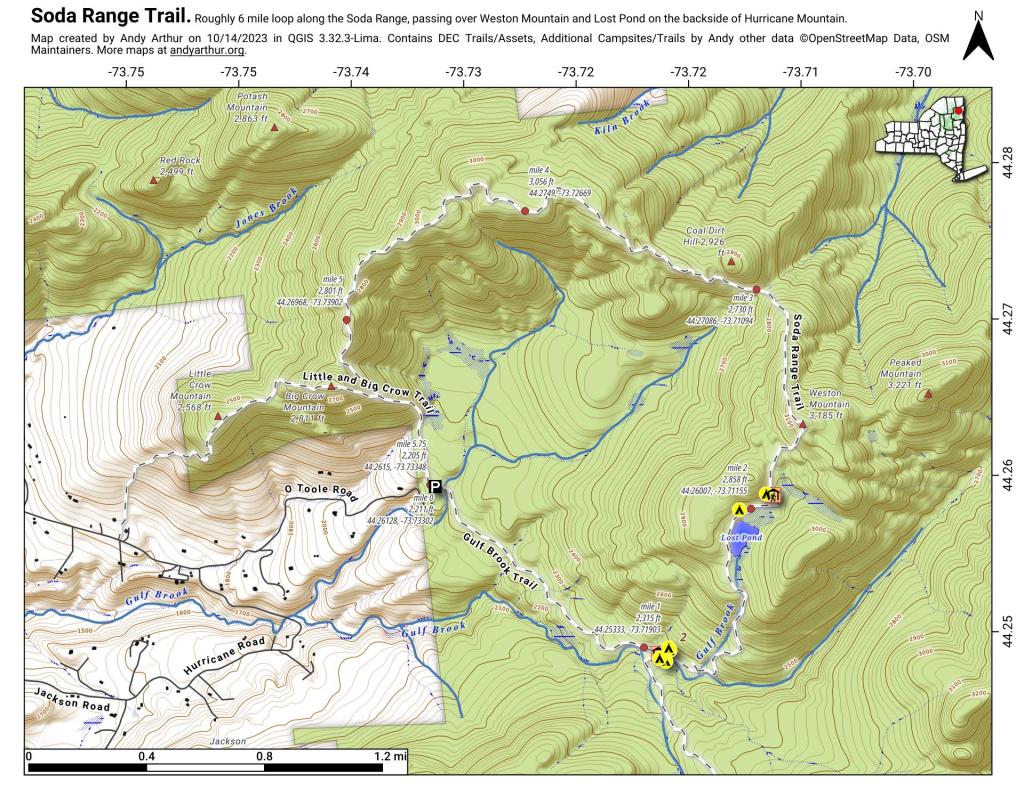
And here is a static (paper) map I created using this code plus adding coordinates and elevation for this hiking map.

Soda Range Trail

An Introduction to Apache Arrow for R Users

Been learning about Apache Arrow for loading and processing extremely large datasets in R quickly without having to set up and use something like a PostgresSQL database. DMV vehicle file, you know what I'm thinking.

Map: Green Mnt NF Forest Road 74 Camping
Map: Empire State Topography